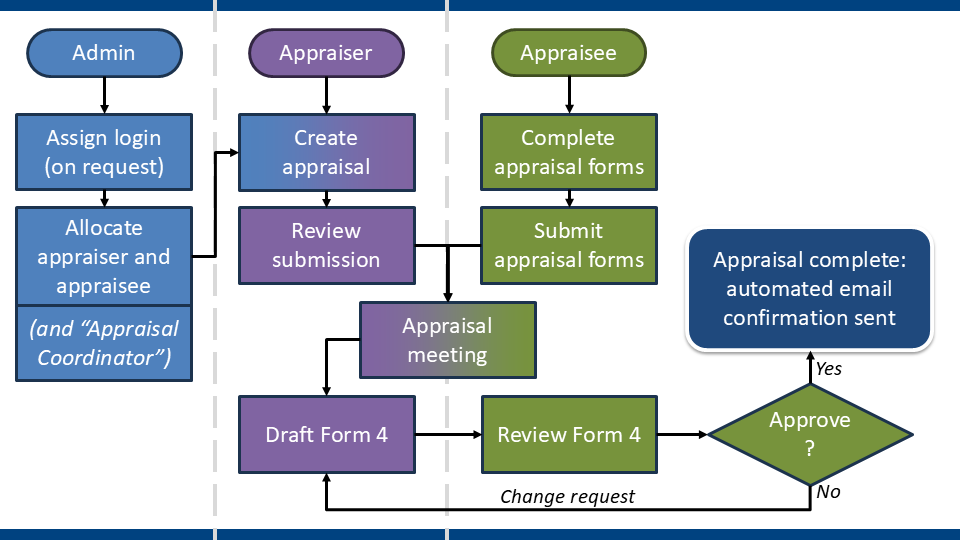
- Appraiser and appraisee agree meeting date/time/location outside of SOAR
- Appraiser creates appraisal meeting on SOAR
- Appraisee completes appraisal forms (this can be started any time throughout the year before meeting is created)
- Appraisee submits completed forms
- Appraisal meeting takes place
- Appraiser drafts Form 4
- Appraiser forwards Form 4 to appraisee for review and sign off
- Process is completed whenever appraisee signs off Form 4
- Automated email confirmation sent thereafter
(click to open enlarged image in new window)
Before you arrange a new appraisal and an appraisee, please check their appraisal history FIRST.
If the appraisee has an old/opened/incomplete appraisal - SOAR will make them complete the oldest appraisal first.
If you were to create another appraisal on top of it, your appraisee cannot submit anything to it until the oldest appraisal(s) are closed off.
To check an appraisee's Appraisal History:
- Login to SOAR (switch to "Appraiser" role)
- Click on Appraisees from the menu
- In the Interview History column, click on the View List link
This will take you to the appraisee's full appraisal history on SOAR. If there is any old opened appraisals (i.e. not the current one) then please contact the appraisee and the health board admin team right away to resolve this to avoid delaying the current appraisal.
You can contact the helpdesk for assistance as required also.
After you have checked the appraisee's appraisal history, you next need to agree a meeting date/time and location with the appraisee via phone / email etc (outside of SOAR).
Once agreed, you just need to pop the details to SOAR so that the appraisee can then share their completed forms with you.
- Login to SOAR (switch to "Appraiser" role)
- Click on Interviews from the menu
- Click on Create Interview button
- You will be prompted to select the appraisee from a dropdown list
- Enter meeting details
- Select Appraisal Period (April to March) of WHEN appraisal is scheduled (NOT what material is discussed - see below for clarification)
- Add any additional comments (if applicable)
- Finish by clicking on Save button
Please Note:
- Creating the appraisal allows the appraisee to submit and share their appraisal forms with you
- Appraisees CAN proceed to complete their appraisal forms without the appraisal being created; BUT until it is created, they have NO way to share the online forms with you
- In some boards where resources allow, appraisal meetings are arranged by the Admin teams; if you are not sure who should be arranging the appraisals - please ask
- Create a new appraisal by creating a NEW interview, NOT by adding a new date to an old/existing/incomplete appraisal
- Only add additional dates to an existing appraisal if more than one meeting was arranged to discuss matters further e.g. late MSF/PSQ submission etc
- Can't select the correct appraisal period? Chances are another appraisal already exists in the same period... Check the appraisee's appraisal history and seek help from your local health board admin teams or the SOAR helpdesk as needed. (See #2c below for more info.)
Appraisal Period is used to log WHEN an appraisal took place in fiscal years (April to March) – rather than what materials were discussed.
This is to satisfy Revalidation requirements and allows us to track whether an appraisee has
been engaging in their annual appraisals.
We expect appraisal discussions to be centred around material within last 12 months/since
last appraisal.
For example:
- If an appraisal took place on 12th March 2023, it would fall under the Appraisal Period of 2022/2023
- If an appraisal took place on 8th April 2023, it would fall under the Appraisal Period of 2023/2024
An appraiser can overwrite/ignore this message in instances of late appraisals (typically in April/May time).
If you are unsure about this, please check with your health board admin teams in the first instance.
If the scheduled meeting has had to be postponed or rescheduled, as the appraiser, you can amend the meeting dates on SOAR, which should then realign the automated emails.
Simply navigate to the appraisal in question, click in the fields that need amended and edit as appropriate - click Save at top of the page when finished.
Alternatively...
...there will be occasions where more than one meeting is required for an appraisal, for example:
- Additional meeting to discuss MSF/PSQ;
- Meeting got cancelled due to illness, etc
DO NOT create a new appraisal.
- Login to SOAR (in Appraiser role) and click on Interviews from the menu
- Search for appraisal; and click on corresponding notepad icon (don’t click on the appraisee's name as this takes you to their profile instead)
- When you are in the meeting details page, click Add new meeting date button
- Enter details of new meeting
- Note reasons/purpose of new meeting in comments section as appropriate (e.g. new meeting to discuss MSF)
- Click Save to finish
Repeat to add more dates as required.
When an appraisee has submitted their completed appraisal forms, you will be sent an email confirmation. You can click on the link which will take you to SOAR, or you can simply login to SOAR and navigate to the appraisal in question and the submission from there.
Please note - as of 2025, all appraisal submissions can only be accessed via PDF function.
To review the PDF, if you use the Edge web browser, it allows you to open PDFs without the need to download them.
Form 4 is the summary document of the appraisal discussion and is drafted by the appraiser; then forwarded and reviewed/approved by the appraisee. It is often used by appraisees as proof of appraisal.
To create a Form 4, navigate to the appraisal in question with the appraisee, on the right of the page will be a series of buttons and the appraiser will see the "Create Form 4" button at the top. Click on this and a new page is created and the appraiser just needs to complete the various sections and forward to appraisee when ready.
(Appraisers not expected to complete this in one sitting - use the "Save" button at top of page to save; and when ready, use "Forward" button at bottom of page to send.
Making changes to Form 4
- Only appraisers can create and edit Form 4 (for quality assurance purposes)
- Once forwarded to the appraisee, Form 4 is locked from further editing
- To make changes, the appraisee needs to make a "Change Request"
- This unlocks the Form 4, allowing the appraiser to edit as appropriate and re-forward
Form 4 – Change Request
- Change Request has to be made by the appraisee
- But they are only able to make a "Change Request" if Form 4 has been forwarded - if not, then it means the Form 4 is still with the appraiser for editing
- If you (the appraiser) are still drafting Form 4, you will see the formatting toolbar in the comments boxes
Once Form 4 is signed off, the appraisal is marked as completed and archived. If the appraisee wants to make changes to Form 4 at this stage, a request needs to be sent to the Health Board Admin (or SOAR Helpdesk) for unlocking.
Appraisees will not be able to amend submitted appraisal forms when the Form 4 has been signed off, but can add further documentation if required (e.g. MSF, PSQ etc) - but again it needs to be enabled by the admin team (see below).
Appraisee instructions are available in the Appraisees section.
When an appraisal is concluded, the submitted forms and documents are archived. The appraisee's draft appraisal forms is wiped to allow for the preparation of next appraisal.
Because of this, it is NOT possible to amend submitted forms or documents after the appraisal has been completed - but further documents can be added if required.
This requires Form 4 to be unlocked via Health Board admins (or SOAR Helpdesk) and the "Additional Documentation" function enabled.
Once Form 4 has been unlocked and "Additional Documentation" is enabled:
- The appraisee navigates to appraisal details page where there should now be an additional tab along the top - "Additional Documentation"
- Appraisees click Upload button to upload documents directly there
- When finished, appraisee can click the Notify Appraiser button, which triggers a system-automated email to the appraiser
- Appraisees will not be able to link documents uploaded in the draft forms
- Any documents uploaded directly here will be included in the PDF export of the submitted forms as well
- Appraiser reviews the submitted documents
- Amend Form 4 (if appropriate) and re-forward to appraisee for sign off
- When Form 4 is signed off again, the newly added documents will also be archived to the appraisal
Form 5A is used in lieu of a Form 4 if the appraisee has a legitimate and valid reason for
exemption from appraisal in a particular appraisal year. Reasons for exemption include:
- Maternity leave
- Sabbatical leave
- Sick leave
- Working abroad etc
To create a Form 5A:
- Create a new appraisal for the appraisee with dummy meeting date/time - please see "Creating an appraisal meeting " above (#2) for reference
- When in appraisal details, click on Create Form 5A button - this creates the Form 5A and you will automatically be taken there
- Select the name of the Appraisal Lead who will approve this Form 5A
- Select the reason for exemption from appraisal
- Select the date that the Appraisee left work and the date that they plan to return to work
- Add further comments if necessary
- Once completed, click button at bottom of page to forward to the selected Appraisal Lead for their review and sign off
- When Form 5A has been signed off by the Appraisal Lead, auto confirmation email is sent to appraisee, appraiser and Appraisal Lead
Please Note:
Appraisers should consult with their Appraisal Lead first before filling out this form.
NB: Form 5B is used to log anyone who fails to engage with the appraisal process. Again, consult with Appraisal Lead in the first instance.
As of mid-2018, a site-wide autosave function was introduced to appraisers.
By default, Autosave is disabled for all users.
But when enabled, it is triggered every 60 seconds, saving whatever form you were filling in. If you altered your form and tried to leave the page before the autosave kicked in, you will be prompted to save the content of your form before leaving the page.
However, there are compatibility and performance issues (speed) for those using Internet Explorer as their web browser.
We appreciate that it is not always possible to change or upgrade the web browser you use, especially if you are in hospital offices or using GP practice computers. So to remedy this, we made the Autosave an opt-in function.
If you are using Internet Explorer and you experienced speed performance issues on SOAR, please consider using an alternative web browser first. If not possible, then you can disable the Autosave.
As an appraiser, please consider (if possible) enabling the Autosave for the purposes of drafting Form 4s.
Autosave can be enabled / disabled by:
- Clicking on the Autosave icon/status message in the header (after you have logged in)
- This will take you to your profile setting
- Click and un/check the tickbox on screen
- Finish by clicking on the Save button
Feedback Form 6 is enabled after appraisal Form 4 is signed off by appraisee. Appraiser completes Form 6B; appraisees complete Form 6A.
Form 6 appears as an additional tab along the top of the appraisal details page; and also as a reminder on the appraisal timeline function on the appraiser dashboard. It will remain on the dashboard for 8 weeks and is hidden automatically thereafter.
For appraisers, the first ten Form 6B are used for benchmarking purposes; thereafter it is optional and the form is designed as a reflective tool with different questions set.
The Form 6 feedback received is collated anonymously into a report which can be accessed via the Reports section from the menu on the left.
The report is anonymised and is designed to help you reflect on your practice in the appraiser role.
Prior to the report being generated, appraisers are asked to set a date parameter. To ensure the process is anonymous, a report is only produced if the search criteria includes at least 3 results.
This applies if your appraisee is a clinical academic.
If when you are creating the appraisal meeting and you notice that the university co-appraiser is not listed - find out from appraisee who the university colleague involved is, and liaise with your health board admin team ASAP to request:
- Co-appraiser is assigned to the appraisee; AND
- Co-appraiser is ADDED to the appraisal you created.
If appraisal is created before a co-appraiser is assigned, then they will need to be manually added to the appraisal so that they have access to the appraisal forms and be involved with the Form 4 sign off.
For more information about the joint appraisal process, please check guidance on Clinical Academics appraisal.
If a duplicate appraisal was created in error please liaise with either the health board admin team or the SOAR helpdesk to delete from the system.
SOAR is designed to handle only one appraisal at a time, duplicate appraisals will lead to appraisee submission confusion and also potentially cause issues in PDP section when signing off Form 4.
Apart from significant system updates, SOAR will not send out notifications about various events or news unless you opt-in to receiving them. The news alerts categories are:
- Local Health Board Updates (Strongly Recommended)
- Appraisal and Revalidation
- Nes Run Events
- Non-Nes Run Events
- Other
To opt in to receiving the relevant news alerts:
- Login to SOAR;
- Click on "My Details" from the menu;
- In the tabs along the top, click on "Notifications/Settings";
- Scroll to the bottom of the page and you will find the list of news alert categories to opt in to, tick the boxes and then scroll to the top of the page and click "Save" to finish.
The "NES-Run Events" category typically is used to contact appraisers re the Appraisers Conference or Refresher programme of activities.